Welcome to the North American IPv6 Task Force website.
The North American IPv6 Task Force (NAv6TF) is a sub-chapter of the IPv6 Forum dedicated to the advancement and propagation of IPv6 (Internet Protocol, version 6) in the North American continent. Comprised of individual members organized under Non-profit 501(c)(3) entities, rather than corporate sponsors, the NAv6TF mission is to provide technical leadership and innovative thought for the successful integration of IPv6 into all facets of networking and telecommunications infrastructure, present and future.
Through its continued facilitation of publications, IPv6 certifications, IPv6-centric conferences, IPv6 test and interoperability events, IPv6 deployment readiness guides, and collaborative leaders from around the globe, the NAv6TF will strive to be the guiding force for IPv6 adoption and readiness in the U.S., Canada and Mexico.
The North American IPv6 Task Force continues to thrive thanks to Jim Bound († 2009) and his initial vision of IPv6 adoption. Jim headed our movement and weaved the social fabric which brought us together. We continue to pursue Jim Bound’s visionary goal of IPv6 Deployment through our voluntary membership of scientists and engineers. The journey is the reward Jim and each of us thank you for inviting us on your flight.
Posted inNAv6TF|Comments Off on North American IPv6 Task Force
The concern the US Government has over foreign-made home routers is that other countries (most notable, China) makes not only the hardware, but also the software that runs these routers. And that they may have put in back-doors, allowing these foreign governments to spy on Americans.
Not an unreasonable concern, since the US Government already spies on Americans, as Ed Snowden pointed out 10 years ago. So is this really an issue of spying, or who is doing the spying?
Interestingly enough, the FCC order grants conditional exemptions for the US Department of Defense (DoD), and the Department of Homeland Security (DHS)
By banning new routers from FCC approval (and thereby for sale), US consumers will be left with older routers, and firmware that isn’t being updated. This doesn’t sound like improving security.
On a recent flight, my interest was piqued when the flight attended announced on the PA that there would be free Wifi on the entire flight. Naturally, I took out my phone and connected to the in-flight Wifi, as almost everyone else on the plane did.
But I suspect that others on the plane didn’t look at what addresses they had received from the in-flight Wifi. Looking at the addresses (with the HE app), not only did I have the usual RFC 1918 private IPv4 address, but I also had two global IPv6 addresses!
Many of us in the IPv6 community have been eagerly waiting for the Google IPv6 Statistics page to show over 50% utilization. We are getting close, topping over 49% on 21 June 2025. Now there are many making predictions as to when the Google Statistic will finally break the 50% mark.
Of course, breaking 50% adoption (as Google calls it), doesn’t mean that IPv4 is finally beaten, and will disappear quickly. There will clearly be the “Long Tail” effect, and I wouldn’t be surprised to see some IPv4 in 2050. The IETF (Internet Engineering Task Force) has already decided that there will be no more development (read: RFCs) for IPv4.
IPv6 Unique Local Addresses (ULA) have been problematic since 2012 when RFC 6724 was published. The problem is that a ULA destination address is prioritized lower than an IPv4 address, including RFC 1918 private addresses. If you are implementing IPv6, and you set up a server with a IPv6 ULA and an IPv4 address (in DNS), only the IPv4 address will be used by clients accessing the server. This leads to a false sense that your IPv6 implementation is working just fine.
For this reason, ULAs have been discouraged. That’s about to change with a new RFC working its way through the IETF. The current draft is expected to reach full RFC status by the end of 2025.
Address Selection Precedence, the old way
With the addition of IPv6, there can now be multiple addresses assigned to a single interface (think Wifi, or Ethernet). There can be multiple IPv6 Global Addresses (GUAs), an IPv6 Link-Local address, an IPv4 address, and even multiple ULAs. Because of this, there must be an algorithm or precedence system to determine which address to use. RFC 6724 published in 2012 standardizes a precedence system for the different types of addresses.
IPv4 addresses are in the ::ffff:0:0/96 block of addresses (represented as Mapped Addresses)
ULAs are in the fc00::7 block of addresses. Since the first half of fc00::/7 are reserved, ULAs are therefore in the fd00::/8 block, and will always start with FD.
Address Selection Precedence, the new way
The RFC Draft looks to address the Precedence problem by updating the precedence of ULAs higher than IPv4 addresses.
The new RFC draft introduces the concept of Known-Local address, which is a ULA in the same /48 as the client host. This allows for Known-Local ULAs to be given a higher precedence than IPv6 GUAs, and will result in clients connecting to servers in the same /48 prefix (but on different subnets) to connect using ULA-to-ULA.
Rolling out this change
Sadly, this change is not an easy change using a Router Advertisement (RA) or DHCPv6 option. The Precedence table is located on each host. It can be found at:
Since the precedence is set on each host, one must touch each host to change it. In a SOHO network, it means changing a handful of hosts individually. In an Enterprise environment, one needs to change the precedence on the image that is used to re-image the corporate laptops.
Why wait, test in the lab now
The RFC is on the standards track, and therefore will become an IETF standard once it is published. Now is the time to re-configure a few of your client and server hosts in the lab to better understand how this change will impact your network. This will save you a lot of time in troubleshooting when the next auto-update for the OS occurs.
Part of the IPv6 Protocol evolution
The updated RFC 6724 draft is part of the third wave of improvements to the IPv6 protocol. It isn’t easy creating a new protocol which is implemented world-wide. IPv4 has its short-comings, and they will remain, as there is no more active development by the IETF for IPv4. IPv6 has been tested in the world-wide internet for decades, deficiencies have been found, and the protocol has evolved, and been improved. With this draft becoming a future standard, the use of ULAs will no longer trip you up.
Notes:
MacOS implements RFC 6724 in getaddrinfo function call. There is no easy way to change precedence.
Windows precedence must be configured using netsh. To see the current precedent table type: netsh int ipv6 show prefixpolicies
Some would say that the Precedence table which created the ULA problem was back in RFC 3484, but since RFC 6724 deprecates 3484, I am sticking with 6724.
For those who have been following my articles, they will know I am a fan of RIPng routing protocol for IPv6 in small networks. It requires little to no configuration, turn it on, and it just works.
Recently, I was exchanging emails with the bird package maintainer for Openwrt, and he suggested I give Babel another look. I looked at the bird implementation of Babel about five years ago, and found the convergence time to be slow. That was back when bird was at version 1.6.3. bird has improved since then and is now at version 3.01.
I set up a small IPv6 test lab to see how the new bird (with Babel support) would perform. In this article I will be making comparisons to RIPng, as to features, and convergence performance.
What is Babel
Babel is a loop-avoiding distance-vector routing protocol that is robust and efficient both in ordinary wired networks and in wireless mesh networks. Based on the loss of hellos the cost of wireless links can be increased, making sketchy wireless links less preferred.
RFC 8966 standardizes the routing protocol. There are two implementations which are supported on OpenWrt routers, babeld and bird
Although I did try babeld on one of my routers as a test, this lab is using the bird implementation of the babel protocol.
Creating a network with redundant paths
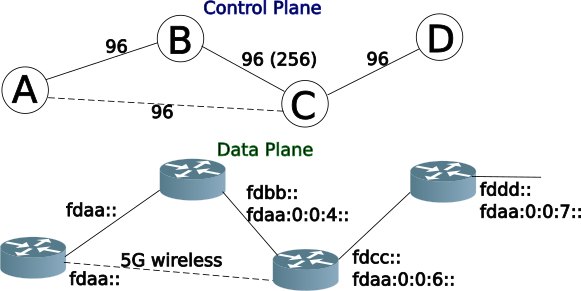
Like anything in networking, it starts with the physical layer (wireless is a form of physical layer). I setup a lab with 4 nodes, AA, BB, CC,and DD, with a redundant path from AA to CC via BB.
In this lab, I used different versions of OpenWrt and bird. I wanted to ensure that the different versions would work together using the Babel Protocol.
Node
Name
Device
OpenWrt
Bird
AA
Waihee
TP-Link AX23
24.10.0
v3.01
BB
Waimanu
MX6
24.10.0-rc7
v2.15
CC
Malmo
BT Home Hub 51
23.05.5
v2.15
DD
Makiki
GL-iNET AR750
18.06.2
v1.6.8
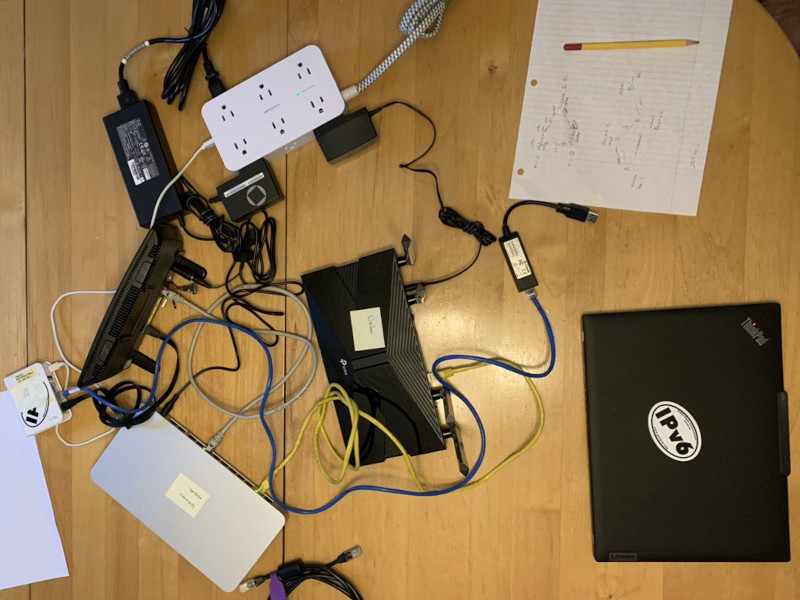
Babel lab on the dining room table
Running BIRD with Babel
As of version 2, bird supports bothIPv4 and IPv6 in the same configuration file: /etc/bird.conf. I used the IPv6-only config in node DD with bird 1.6.8
The Bird Documentation provides an example. The following is a basic Babel IPv6 configuration (/etc/bird.conf) to just plug and play, without any wireless link additions, which will run similar to RIPng (but converge faster).
# Basic bird.conf for Babel

# Use Source Address Dependent Routing Routing (SADR)
ipv6 sadr table sadr6;

protocol kernel {
    ipv6 sadr {
       export all;    # Default is export none
       table sadr6;
    };
}

# Required to get info about Net Interfaces from Kernel
protocol device {
}

#advertises directly connected interfaces
protocol direct {
    ipv6 sadr {
         table sadr6;
    };
    interface "*";
}


protocol babel {
    # duplicate interface line to add additional interfaces
    interface "*";

    ipv6 sadr {
        import all;
        export all;
        table sadr6;
    };
    # prevent stale routes staying in the network on restart
    randomize router id yes;
}
In the example (above), the interface "*"; could be more specific and list several interfaces, where eth0 is the WAN interface, such as:
    interface "br-lan";
    interface "eth0";
However, your router may have a different interface than eth0 for the WAN, and the example config is more universal.
Firewall Configuration for Babel
Similar to RIPng, a firewall rule is required to allow Babel routes in on the WAN interface. Not surprisingly, Babel uses a different port from RIPng, 6696.
Place the following rule in /etc/config/firewall for Babel, and reload the firewall: fw4 reload
   config rule
       option name 'Babel'
       option family 'ipv6'
       list proto 'udp'
       option src 'wan'
       option dest_port '6696'
       option target 'ACCEPT'
Checking the path of connectivity
When determining the connectivity path, traceroute6 (the IPv6 version) is your friend. Checking between Node DD and Node AA, the path is (showing the wireless link):
root@makiki:~# traceroute6 aa
traceroute to aa (fdaa::1) from fdcc::e695:6eff:fe01:aa01, 30 hops max, 16 byte packets
 1  cc (fdcc::1)  0.849 ms  0.78 ms  0.657 ms
 2  fdaa::e255:3dff:fe75:70af (fdaa::e255:3dff:fe75:70af)  1.861 ms  1.525 ms  1.437 ms
 3  fdaa::e255:3dff:fe75:70af (fdaa::e255:3dff:fe75:70af)  1.592 ms  1.598 ms  1.437 ms
And below traceroute is showing the the path via the wired link (between Node DD & AA):
root@makiki:~# traceroute6 aa
traceroute to aa (fdaa::1) from fdaa:0:0:6::d7b, 30 hops max, 16 byte packets
 1  fdaa:0:0:6::1 (fdaa:0:0:6::1)  0.74 ms  0.726 ms  0.679 ms
 2  fdaa:0:0:4::1 (fdaa:0:0:4::1)  0.917 ms  0.764 ms  0.747 ms
 3  aa (fdaa::1)  1.437 ms  1.099 ms  1.02 ms
Network Failure!
To test how well Babel can automatically route around failed links, I started a ping from Node DD to Node AA and unplugged the disabled the wifi on Node CC, thus blocking the link the pings were using, and waited…
...
64 bytes from fdaa::1: seq=15 ttl=63 time=2.263 ms
64 bytes from fdaa::1: seq=16 ttl=63 time=2.168 ms
64 bytes from fdaa::1: seq=17 ttl=63 time=2.078 ms
64 bytes from fdaa::1: seq=92 ttl=62 time=1.461 ms
64 bytes from fdaa::1: seq=93 ttl=62 time=1.756 ms
64 bytes from fdaa::1: seq=94 ttl=62 time=1.268 ms
64 bytes from fdaa::1: seq=95 ttl=62 time=1.337 ms
64 bytes from fdaa::1: seq=96 ttl=62 time=1.265 ms
64 bytes from fdaa::1: seq=97 ttl=62 time=1.269 ms
64 bytes from fdaa::1: seq=98 ttl=62 time=1.302 ms
64 bytes from fdaa::1: seq=99 ttl=62 time=1.293 ms
64 bytes from fdaa::1: seq=100 ttl=62 time=1.256 ms
64 bytes from fdaa::1: seq=101 ttl=62 time=1.363 ms
^C
--- aa ping statistics ---
103 packets transmitted, 28 packets received, 72% packet loss
round-trip min/avg/max = 1.256/1.837/2.966 ms
As you can see the outage was 75 seconds (103-287). Not particularly faster than RIPng, and it did fix itself (called convergence) without human intervention.
Restoring the Network
Starting a ping6 again from node DD to AA, and enabling the 5 Ghz radio, one can measure the time of the outage while Babel recalculates the shortest path. And there was no outage.
Restoring the Node CC to AA wireless link, I noticed that the network would continue to use the path DD->CC->BB->AA, and would not flip to the DD->CC->AA path. This is because the example bird.conf above has no specific wireless link configuration.
So I tried again, to see how fast the wireless link would take up the traffic. Starting the ping again from Node DD to AA, I pulled the ethernet cable between Node CC & BB.
...
64 bytes from fdaa::1: seq=9 ttl=63 time=2.144 ms
64 bytes from fdaa::1: seq=10 ttl=63 time=2.390 ms
64 bytes from fdaa::1: seq=11 ttl=63 time=2.287 ms
64 bytes from fdaa::1: seq=12 ttl=63 time=2.150 ms
64 bytes from fdaa::1: seq=13 ttl=63 time=2.271 ms
64 bytes from fdaa::1: seq=14 ttl=63 time=2.011 ms
64 bytes from fdaa::1: seq=15 ttl=63 time=1.970 ms
64 bytes from fdaa::1: seq=16 ttl=63 time=2.075 ms
64 bytes from fdaa::1: seq=17 ttl=63 time=1.978 ms
64 bytes from fdaa::1: seq=18 ttl=63 time=2.137 ms
64 bytes from fdaa::1: seq=19 ttl=63 time=3.590 ms
^C
--- aa ping statistics ---
20 packets transmitted, 19 packets received, 5% packet loss
round-trip min/avg/max = 1.619/2.221/4.438 ms
Convergence was 1 second, much faster than RIPng!
Adjusting bird.conf for Wireless Links
In order to tell Babel that there is a wireless link (between Node AA & CC) one must change the Babel configuration in /etc/bird.conf a bit:
...
protocol babel {
    # duplicate interface line to add additional interfaces
    interface `"phy0-sta0" {
        type wireless;
    };
    interface "*";
    ipv6 sadr {
        import all;
        export all;
        table sadr6;
    };
    # prevent stale routes staying in the network on restart
    randomize router id yes;
}
Because I wanted to change the config as little as possible, I called out the one interface (phy0-sta0) as wireless first, then all other interfaces (indicated as *) would be treated as wired. If you reverse the interface lines, phy0-sta0 will be included in the "*" and won’t be treated as wireless. Order is important.
By defining the phy0-sta0 interface as wireless, the default cost will be increased to 256, and therefore the wireless link will be less preferred than wired links (default cost is 96).
Bird CLI
On OpenWrt there is also a Bird CLI package called birdc. It offers a nice view of what Bird is doing under the covers. Since I was keeping things simple, only Babel was enabled, but bird can certainly redistribute routes between differing routing protocols such as RIPng, OSPF and Babel.
bird has a nice CLI, which can be invoked with the birdc command, and get a bird> prompt. That said, it can also be run on the shell command line, and output can be piped to grep or even a file. I tend to use the shell method.
Looking at Babel running in bird, one can see the interfaces, neighbours, and route table entries. Looking at node CC.
root@Malmo:/etc# birdc show babel interface
BIRD 2.15.1 ready.
babel1:
Interface  State  Auth  RX cost   Nbrs   Timer Next hop (v4)   Next hop (v6)
eth0       Up     No         96      0   1.910 ::              fe80::3897:38ff:fef5:4167
wan        Up     No         96      1   3.367 192.168.174.214 fe80::3897:38ff:fef5:4167
br-lan     Up     No         96      1   0.409 192.168.116.1   fe80::1a62:2cff:fe07:a474
phy0-sta0  Up     No        256      2   1.999 192.168.117.206 fe80::1a62:2cff:fe07:a477
Since this is IPv6, not surprisingly, the neighbours command displays the link-local addresses of the Babel peers. And this is where vanity link-local addressing really comes in handy. Sadly, I didn’t use it in this small lab.
root@Malmo:~# birdc show babel neighbor
BIRD 2.15.1 ready.
babel1:
IP address                Interface  Metric Routes Hellos Expires Auth  RTT (ms)
fe80::e255:3dff:fe75:70ae wan            96      9     16   3.866 No       0.674
fe80::e695:6eff:fe01:aa01 br-lan         96      9     16   4.557 No       0.000
fe80::7ef1:7eff:fe11:bc75 phy0-sta0      96      9     16   2.671 No       2.026
fe80::e255:3dff:fe75:70af phy0-sta0      96      9     16   4.990 No       1.938
The routes show the routing entries which it will use to calculate paths:
root@Waimanu:~# birdc show babel route
BIRD 2.16.1 ready.
babel1:
Prefix                                                 Nexthop                   Interface Metric F Seqno Expires
fdaa:0:0:6::d7b/128 from ::/0                          fe80::3897:38ff:fef5:4167 br-lan       192 *    68  51.657
fdaa:0:0:6::d7b/128 from ::/0                          fe80::7ef1:7eff:fe11:bc75 br-wan       384      68  53.645
fdaa:0:0:6::d7b/128 from ::/0                          fe80::1a62:2cff:fe07:a477 br-wan       388 +    68  49.096
fdaa:0:0:4::/64 from ::/0                              fe80::3897:38ff:fef5:4167 br-lan        96 *     9  51.657
fdaa:0:0:4::/64 from ::/0                              fe80::7ef1:7eff:fe11:bc75 br-wan       288       9  53.645
fdaa:0:0:4::/64 from ::/0                              fe80::1a62:2cff:fe07:a477 br-wan       292 +     9  49.096
fdbb::/64 from ::/0                                    fe80::3897:38ff:fef5:4167 br-lan        96 *     9  51.657
fdbb::/64 from ::/0                                    fe80::7ef1:7eff:fe11:bc75 br-wan       288       9  53.645
fdbb::/64 from ::/0                                    fe80::1a62:2cff:fe07:a477 br-wan       292 +     9  49.096
fdaa:0:0:6::/63 from ::/0                              fe80::7ef1:7eff:fe11:bc75 br-wan       288       9  53.645
fdaa:0:0:6::/63 from ::/0                              fe80::3897:38ff:fef5:4167 br-lan        96 *     9  51.657
fdaa:0:0:6::/63 from ::/0                              fe80::1a62:2cff:fe07:a477 br-wan       292 +     9  49.096
fd8d:54d4:73fa::/60 from ::/0                          fe80::7ef1:7eff:fe11:bc75 br-wan       288       9  53.645
fd8d:54d4:73fa::/60 from ::/0                          fe80::3897:38ff:fef5:4167 br-lan        96 *     9  51.657
fd8d:54d4:73fa::/60 from ::/0                          fe80::1a62:2cff:fe07:a477 br-wan       292 +     9  49.096
fd93:7f97:8ab8:6::/63 from ::/0                        fe80::7ef1:7eff:fe11:bc75 br-wan       288       9  53.645
fd93:7f97:8ab8:6::/63 from ::/0                        fe80::3897:38ff:fef5:4167 br-lan        96 *     9  51.657
fd93:7f97:8ab8:6::/63 from ::/0                        fe80::1a62:2cff:fe07:a477 br-wan       292 +     9  49.096
fdbb:0:0:2::/63 from ::/0                              fe80::7ef1:7eff:fe11:bc75 br-wan       288       9  53.645
fdbb:0:0:2::/63 from ::/0                              fe80::3897:38ff:fef5:4167 br-lan        96 *     9  51.657
fdbb:0:0:2::/63 from ::/0                              fe80::1a62:2cff:fe07:a477 br-wan       292 +     9  49.096
fd8d:54d4:73fa::/64 from ::/0                          fe80::7ef1:7eff:fe11:bc75 br-wan       384      68  53.645
fd8d:54d4:73fa::/64 from ::/0                          fe80::3897:38ff:fef5:4167 br-lan       192 *    68  51.657
fd8d:54d4:73fa::/64 from ::/0                          fe80::1a62:2cff:fe07:a477 br-wan       388 +    68  49.096
fd93:7f97:8ab8::/60 from ::/0                          fe80::7ef1:7eff:fe11:bc75 br-wan        96 *     9  53.645
fd93:7f97:8ab8::/60 from ::/0                          fe80::3897:38ff:fef5:4167 br-lan       192       9  51.657
fd93:7f97:8ab8::/60 from ::/0                          fe80::1a62:2cff:fe07:a477 br-wan       388       9  49.096
fdbb::c9c/128 from ::/0                                fe80::3897:38ff:fef5:4167 br-lan        96 *     9  51.657
fdbb::c9c/128 from ::/0                                fe80::7ef1:7eff:fe11:bc75 br-wan       288       9  53.645
fdbb::c9c/128 from ::/0                                fe80::1a62:2cff:fe07:a477 br-wan       292 +     9  49.096
fdcc::/60 from ::/0                                    fe80::7ef1:7eff:fe11:bc75 br-wan       288       9  53.645
fdcc::/60 from ::/0                                    fe80::3897:38ff:fef5:4167 br-lan        96 *     9  51.657
fdcc::/60 from ::/0                                    fe80::1a62:2cff:fe07:a477 br-wan       292 +     9  49.096
fd93:7f97:8ab8:4::/64 from ::/0                        fe80::3897:38ff:fef5:4167 br-lan        96 *     9  51.657
fd93:7f97:8ab8:4::/64 from ::/0                        fe80::7ef1:7eff:fe11:bc75 br-wan       288       9  53.645
fd93:7f97:8ab8:4::/64 from ::/0                        fe80::1a62:2cff:fe07:a477 br-wan       292 +     9  49.096
fdaa::/60 from ::/0                                    fe80::7ef1:7eff:fe11:bc75 br-wan        96 *     9  53.645
fdaa::/60 from ::/0                                    fe80::3897:38ff:fef5:4167 br-lan       192       9  51.657
fdaa::/60 from ::/0                                    fe80::1a62:2cff:fe07:a477 br-wan       388       9  49.096
fd68:7aa9:9d9a::/64 from ::/0                          fe80::3897:38ff:fef5:4167 br-lan        96 *     9  51.657
fd68:7aa9:9d9a::/64 from ::/0                          fe80::7ef1:7eff:fe11:bc75 br-wan       288       9  53.645
fd68:7aa9:9d9a::/64 from ::/0                          fe80::1a62:2cff:fe07:a477 br-wan       292 +     9  49.096
fdaa:0:0:4::c9c/128 from ::/0                          fe80::3897:38ff:fef5:4167 br-lan        96 *     9  51.657
fdaa:0:0:4::c9c/128 from ::/0                          fe80::7ef1:7eff:fe11:bc75 br-wan       288       9  53.645
fdaa:0:0:4::c9c/128 from ::/0                          fe80::1a62:2cff:fe07:a477 br-wan       292 +     9  49.096
As you can see four (4) nodes with only four links (one is wireless) can create quite the routing table. That said, 18 of the routes are due to ULAs being set on each router (a default in OpenWrt). RIPng also creates a lot of routes as well.
A note about RouterIDs
Unlike RIPng which has no concept of RouterID, Babel uses RouterID to identify the source of routes and avoid loops. Using wireshark to sniff the Babel packets (UDP port 6696), it can be seen that the RouterIDs are being transmitted. The line in at the bottom of the config file helps flush old routes from the other routers when restarting bird (or reloading a config)
# prevent stale routes staying in the network on restart
randomize router id yes;
Comparing Babel to RIPng
Babel is still being actively developed, and has a more modern approach to wireless links (something that was near non-existent when RIPng was being standardized back in 1997). There are more controls that can be applied to Babel for wireless links. Refer to the Babel Doc for more info.
Additionally, Babel has support for authentication between neighbours (something OSPF has had since the 1990s). Sadly, RIPng does not have this feature, as the IPv6 team was enamored with IPSec over IPv6 at the time. Authentication can be passwords, or even encrypted hashes (hmac sha1 | hmac sha256 | hmac sha384 | hmac sha512| blake2s128 | blake2s256 | blake2b256 | blake2b512), so that even your router jocks won’t know the passwords by looking at the bird.conf file.
Babel also has the concept of Round Trip Time (RTT), as you will note in the show babel neighbors command. The config file can be further adjusted to handle variable (read: wireless links) RTT time, and take action if the RTT exceeds a configured value.
Network Convergence with Babel’s wireless option
I did configure the phy0-sta0 (on node CC) as wireless. This caused the network to prefer the ethernet-only path (DD->CC->BB->AA). By removing the ethernet cable between nodes CC & BB, the reconvegence to the wireless link was quite fast (about 5 seconds). However, when restoring the ethernet cable, I noted that the network would reconverge again in about 5 seconds, but then after another 30 seconds or so there would be nearly a full minute of outage.
This second outage may be a result of my lab setup. Even with the second minute long outage, the total convergence time is much less than RIPng. Looking back at my old RIPng notes, where the outages were closer to three (3) minutes.
Of course some of that delay is that RIPng only sends updates every 30 seconds. Babel on the other hand send hello messages out every two (2) seconds.
Wrapping up Babel
Like RIPng, Babel is easy to set up without having to understand the complexities of more enterprise-level routing protocols such as OSPF or IS-IS. It has been the choice of mesh-networks where radio links are variable. It is easy to setup on OpenWrt routers and provides redundancy in your SOHO network with wired and wireless links. I think I’ll be converting my SOHO network from RIPng to Babel soon.
Lab Notes:
Used the “Global Network ULA” option to set addresses fdaa::/60, fdbb::/60, fdcc::/60, and fddd::/60 on nodes AA, BB, CC, and DD respectively
Node AA also supplied Prefix Delegation (PD) to the downstream routers (Nodes BB & CC)
I was unable to get OpenWrt to split off the wireless from br-lan. Therefore both the wired connection to node BB and wireless to node CC were in the same “broadcast domain”. I suspect this caused the longer convergence times for Babel.
Posted inipv6hawaii|Comments Off on Babel Redux: Easy to use as RIPng, but with wireless support
I have been an IPv6 Advocate since the early days of IPv6 support by BayNetworks back in 1998. And I know as much as anyone else, that 2128 is a really big number*. So it seems inconceivable that one could run out of IPv6 addresses, but I managed to do just that.
Let me explain. I am a co-organizer of a Network Special Interest Group (NetSIG), and setup labs to discuss networking. We cover issues such as Wifi, Mesh technologies, tunneling, containers, and routing. As an IPv6 advocate, I like to include IPv6 in our labs. However not surprisingly our meeting location has IPv4-only internet access.
I have overcome this IPv4-only problem by setting up a portable router with a WireGuard VPN connection back to my IPv6 enabled house. The router runs a split tunnel, with IPv4 going directly to the internet (through a few layers of NAT), and IPv6 going through the WG tunnel. There is extra latency on the IPv6 path, but it works.
Spoiler Alert: My house IPv6 address plan was inadequate to the task of running a remote lab at the end of a Wireguard VPN.
Address Planning
One of the key items when setting up an IPv6 network is address planning. Back in the old days (read: the 1990s) we had to do this with IPv4 as well, but it has become a lost art for the folks who grew up only knowing NAT.
Like many residential IPv6 services, I get a /56 from my ISP. Doing basic math, that is 2^8 or 256 prefixes. But like many residential services, there is no static prefix from the ISP. It can change any time, which makes Address Planning a little more of a challenge.
Fortunately, OpenWrt has some nice support for automatically splitting up IPv6 address space, and passing out chunks of prefixes to downstream routers.
How to run out of IPv6 prefixes
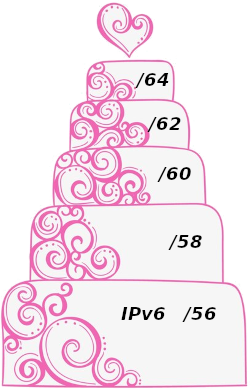
OpenWrt uses the old HomeNet mechanism for allocating prefixes to downstream routers. Basically, it divides the number of LAN ports into the current prefix size on the router. So a standard home router with 4 ports, will divide the prefix on the router, say a /56 by 4 and Prefix Delegation (PD) will pass out /58’s to the downstream routers.
As you can see if you think of the ISP allocated address space like the bottom layer of a wedding cake, each successive layer being 1/4 of the prefix space, you are going to run out of IPv6 prefixes!
OpenWrt IPv6 Prefix Delegation Scheme
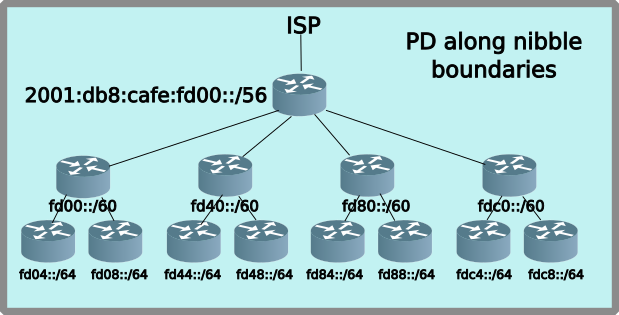
Sadly, the OpenWrt default automagic prefix-slicing, doesn’t adhere to best practices of splitting prefixes along nibble boundaries. Utilizing the ip6assign and ip6hint it is possible to make PD requests which do follow the nibble boundaries. However this reduces the number of layers in the PD cake to three!
Splitting prefixes along nibble boundaries on OpenWrt
OpenWrt helps correct this by allowing PD routers to request a hint and a prefix size. This can be configured in the web GUI (LuCI), or just added directly to the /etc/config/network file:
config interface 'lan'
    ...
    option device 'br-lan.1'
    option proto 'static'
    option ipaddr '192.168.232.1'
    option netmask '255.255.255.0'
    option ip6hint '40'            #PD hint
    option ip6assign '60'          #PD request size
    option ip6weight '5'           #Signals to the upstream router the order of multiple routers requesting PD
The last item, ip6weight assists the upstream router in handing out PD when multiple downstream routers are making PD requests. This is needed because in a SOHO (Small Office Home Office) environment, it is possible to have the entire house lose power (black out). When the power is restored, there will be multiple routers making PD requests to the upstream router, the ip6weight establishes an order (and hence prefix-slice) of allocation.
This all seems a bit complicated, and it kind of is. But the nice part is that it takes place all automagically. After a power failure, the network comes up, perhaps with a new /56 prefix from the ISP, and all the routers obtain the new prefix-slices, without user intervention.
Not Quite Best Practice Address Planning
In my network, I am using a hybrid address planning scheme, where the major networks: Production, Test, IPv6-only, DMZ and my Wireguard VPN all get a /60 each. This looks like the following:
This scheme allows up to 16 major networks (all /60), each of which can have up to 4 downstream PD routers (not necessarily on nibble boundaries)
Running out of IPv6 Addresses
By the time the IPv6 network trickles down to the NetSIG lab, there was only a /63 available on the LAN. When we had a lab which setup cute but powerful NanoPi routers, I ran out of IPv6 GUA prefixes after two routers, and we had four NanoPis in the lab!
Naturally, this didn’t go over so well in the lab. After all, all the NanoPi’s did NAT for IPv4, and it was just another layer of NAT, but there was still IPv4 address space. How is IPv6 better?!? It just is, OK?
Back to the Address Planning Drawing Board
Clearly, I wasn’t looking for a repeat of that problem in the lab. But how to get more addresses into the remote lab (remember there is a long line of routers back to my house)? After giving it some thought, the answer was to give the remote lab its own /60, but how-to do that with the prefix-slicing of OpenWrt?
Prefix Delegation Refresher
Prefix Delegation (PD) is a great thing, automatically prefix-slicing to downstream routers. But how does it really work? PD performs two key functions:
Allocates a slice of the delegating router’s prefix to PD requesting routers (via DHCPv6-PD)
Inserting a route for the above prefix-slice (#1) into the delegating router’s route table
The second function is pretty transparent, but the PD delegated network won’t work without it, since the delegating router won’t know where to send the packets.
Fortunately, OpenWrt makes it easy to assign a /60 to a router, which it will then hand out prefix-slices on the LAN. I gave the travel/lab router its own /60. Again, in the /etc/config/network file:
config interface 'wan6'
    option device 'eth0.2'
    option proto 'dhcpv6'
    option reqprefix 'no'
    list ip6prefix '2001:db8:cafe:fdd0::/60'
That takes care of #1 allocating a slice of prefix to the router, but still leaves the issue of #2, putting in route in the upstream router. Of course, I could have put a static route in. But I don’t like static routes, they never change, and when the network goes wonky, they are still there trying to shove packets to places that may no longer be valid. And this is where RIPng come in.
The upstream WG router was already was running RIPng, so it was trivial to install the bird routing daemon and enable RIPng on the travel/lab router.
The Remote Lab Network gets a /60
Assigning a /60 to the travel/lab router, makes a new major network on my house network, and now gives me 16 prefixes to use in the remote lab
Network
Prefix
Length
Remote Lab
2001:db8:cafe:fdd0::
/60
RIPng Automagic
The advantage of running a dynamic routing protocol such as RIPng, is that when my travel/lab router drops off the network, the remote lab /60 is automatically removed from my network. I don’t have to do any re-configuring, or worrying about static routes which a lying in wait, ready to burn me.
IPv6 Address Space is Not Infinite
As I found out, there are corner cases where it is possible to run out of IPv6 address space. And this goes back to Address Planning in IPv6. Pretty much everyone’s first IPv6 Address Plan will require reworking, as situations arise and corner cases appear. But don’t let that prevent you from deploying IPv6. Yes, it may require tweaking, or even revamping your address plan. But that is OK, it is part of the IPv6 networking journey. We weren’t born knowing IPv4, it is just that we have been using it for a while, and we are used to it.
My problem was that I was thinking too small in my address plan, and didn’t allocate enough address space to my travel/lab router. Now I am ready for the next lab, bring on that army of NanoPi routers.
Sine 1995 when RFC 1883 was published, IPv6 started to evolve towards the protocol needed to cope with the growth of the Internet. Since that time, deployment of IPv6 has grown to almost half of the traffic (as identified by Google). I think that many of us that have been advocating for this deployment are happy to see this growth (though maybe a little impatient with the pace of the growth).
To me, this level of work is encouraging. A lot of the work seems to more concentrated on facilitating enterprise deployments (DHCPv6, for example) and the considerations that arise from IPv6 only and IPv6 mostly networks. If you have interest, please investigate these developments. I know the IETF Is always looking for helpful participants to move along the Internet Standards process.
One more thing: There has been a bit a kerfuffle over the migration of the IETF mailing lists to a new commercial provider. You can read more about it here. I remain concerned that should a provider be used that does not support IPv6 today, the IETF is not really supporting the notion that IPv6 is ready for broad deployment. I realize the complications of supporting email in today’s world and that some of those methods involve reputation evaluation of the email sender based on legacy approaches. However, I am also of the opinion that the IETF is uniquely positioned to develop standards that can supplant these approaches.
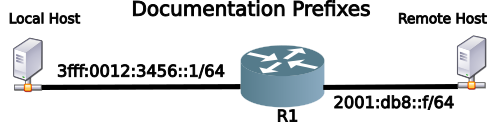
Since 2004, there has a been a Documentation Prefix for IPv6 (RFC 3849) or 2001:db8::/32. And all though this seems like enough space to allocate for Local Area Networks (LANs), even larger ones, it wasn’t good for creating documentation for Autonomous System (AS) to AS connections using Border Gateway Protocol (BGP4). Each AS would have a 2001:db8::/32 address, and that just isn’t how routers route.
After twenty (20) years, we finally have a second IPv6 Documentation prefix (RFC 9637: Expanding the IPv6 Documentation Space) or 3fff::/20. The new prefix is still part of the original IPv6 unicast address allocation of 2000::3 (which also includes 3000::/3).
What Are Documentation Prefixes
Not surprisingly, Documentation Prefixes should be used in Documentations. In network examples, both in print and online should be using either RFC 3849 or RFC 9637 address space, or both. Here’s an example:
IPv4 Documentation Addresses
Most people use (RFC 1918 Address Allocation for Private Internets) for documenting IPv4 examples. But did you know there are IPv4 addresses specifically allocated for documentation. Back in 2010, RFC 5737 was penned. The following address blocks should be used for IPv4 examples.
192.0.2.0/24 (TEST-NET-1)
198.51.100.0/24 (TEST-NET-2)
203.0.113.0/24 (TEST-NET-3)
Plenty of room to Document
The Internet Assigned Numbers Authority (IANA) has set aside Prefixes for the purpose of of creating examples in documentation. You can find all the IPv6 allocations at IANA’s website. The IPv6 documentation prefixes are:
I use a laptop, like most people. I also tend to put my laptop to sleep several times a day, sometimes for hours. In an IPv6 environment, putting the laptop asleep will break all the ssh (and X11 forwarded apps) sessions that I have running.
I also connect my laptop to several different Wifi Networks at my house, and ssh disconnects happen a lot.
The Problem
With StateLess Address Auto Config (SLAAC), by default IPv6 will use temporary addresses (RFC 8981) for outbound connections, including ssh. While it possible to disable this feature, in most cases I prefer temporary addresses to be used (e.g. https sessions).
However, in the modern world, putting a Linux laptop to sleep, will cause systemd to generate new temporary addresses, and the ssh connection(s) will not be restored after waking up the laptop.
Of course, one could turn off SLAAC, and just run DHCPv6. But I like SLAAC, it just works. And with RFC 7271, SLAAC makes better use of the 64 bit Interface ID (IID) space by generating a pseudo-random IID, making it even harder to guess the hosts IP address.
A solution
By binding the ssh session to a local Stable SLAAC address, the ssh session will remain connected after the laptop wakes up from sleep and reconnects to the network.
There’s a couple of ways to achieve the binding:
Configure BindAddress in your local ssh_config file (~/.ssh/config)
Use the -b option when calling ssh directly
The problem with #1 is that if your laptop roams to another network, the BindAddress will be incorrect, and ssh will no longer work.
The challenge with #2, is you have to figure out what address to place on the command line for the -b parameter
Introducing 6ssh.sh
I have created a bash script to automate the #2 operation. Basically, the script looks at the active interfaces, and selects the first Stable SLAAC Address it finds, and calls ssh -b <stable slaac address>
Like all good scripts, there is help:
$ ./6ssh.sh -h
    ./6ssh.sh - ssh using Stable SLAAC Source Address
    e.g. ./6ssh.sh <host>
    -i <int> use this interface
    -u  use ULA address (default GUA)
    -X  use X forwarding
It depends. Since ssh uses Transmission Control Protocol (TCP), it depends on the server’s TCP timers. Using the default settings of my Linux server, I have found that the ssh session will survive a laptop sleep over dinner.
My beta tester increased their server TCP timers, and had their ssh session still be active upon waking up the laptop after a 12 hour sleep! Of course, you probably don’t want to change your server’s TCP settings if it is exposed to the internet, since someone will try to exhaust all your TCP buffers (resulting in a DoS attack).
Using ssh and SLAAC is now easy
One no longer has to pine for the old days of just one IP address for an interface. SLAAC is not only easy, but a standardized method for a host to get a Globally Unique (GUA) IPv6 address without requiring a server. And with 6ssh.sh you can sleep/wake your laptop many times during the day, and all your ssh sessions (and X11 forwarded apps) will be there waiting for you.
Notes:
SSH Logo from openssh.org of days past.
RFC 7271 A Method for Generating Semantically Opaque Interface Identifiers with IPv6 Stateless Address Autoconfiguration (SLAAC)
6ssh.sh may not be needed on MacOS (as it treats the interfaces differently when the laptop is sleeping)
Posted inipv6hawaii|Comments Off on SSH + Stable SLAAC Address = 6ssh
I was recently giving a talk on Container Networking, which included LXD/Incus (Incus is the community fork of LXD), Docker and Podman.
One can think of Linux Containers as light weight virtual machines, however, they share the same Linux kernel as the host. Docker of course, is the most popular container framework, but there are others which accomplish the isolation of a specific application, or an entire file system from the host operating system.
It has been a few years, since I have played with Docker, preferring LXD because of its much better IPv6 support. To my pleasant surprise, the Docker proxy now supports IPv6, as well as IPv4.
Docker Manual IPv6 Configuration
I have been unimpressed with Docker’s IPv6 support in the past. When it was added, it was all manual, like a throwback to the 1990s before DHCP, requiring the configuration of address, mask, default gateway, DNS, etc. There was no easy way to have a container pick up your router’s RA (Router Advertisment) and auto configure a SLAAC (Stateless Address Auto Configuration). It was, and is still a very manual operation to get IPv6 going in Docker, and that is assuming that the Container you have selected from Docker Hub even supports IPv6.
The Docker Bridge (Really a Proxy)
Docker has had for some time a component they call a “bridge”. In Classical networking a bridge is a Layer 2 device, that forwards packets based on destination MAC address. This is not how the Docker Bridge works.
The Docker bridge includes input/output port mapping, and even IP protocol conversion (IPv6<->IPv4). More on this later.
The advantage/disadvantage of the Docker framework bridge is that it creates isolation of the container from the network. For example, only certain TCP/UDP ports are forwarded into the Container.
Starting a Simple Docker Container
As you will find there are thousands of pre-made Docker containers on Docker Hub. Let’s start with a relatively simple one, called containous/whoami. It just reports the IP address of the container and the remote IP address of the HTTP request.
Assuming you have Docker installed and running on your host (I used a Raspberry Pi), start this simple container with the following command:
docker run -d -p 8888:80 --name iamfoo containous/whoami
The -p parameter maps the container’s port 80 to an external (on the host side) port of 8888.
Querying Your Docker Container
Now that you have whoami running, point your Web browser at the IP address of your host, including port 8888, Or use curl to see the output of whoami, like this:
$ curl http://192.168.1.100:8888/
In the above request, the host’s IP address is 192.168.1.100. Great, you can see that whoami has the following output:
As you can see the remote address (RemoteAddr) is listed as 172.17.0.1. Clearly the Docker Proxy is doing NAT (Network Address Translation).
Docker Proxy Now Supports IPv6
Not sure in which version, but in the past few years, the Docker Proxy now also opens a listening socket on IPv6, in the above example on port 8888. netstat will show the open port on IPv6
$ sudo netstat -antp
...
Proto Recv-Q Send-Q Local Address           Foreign Address         State       PID/Program name
tcp        0      0 :::8888                 :::*                    LISTEN      4932/docker-proxy
Querying Your Docker Container Over IPv6
We do a similar web request using curl but this time, we’ll use the IPv6 address of the host. Since we are using a bare IPv6 address, it must be wrapped in square brackets.
Congratulations, we just made a HTTP request over IPv6 to a Docker Container without having to do all the manual IPv6 configuration.
Limitations to the Docker Proxy IPv6 Support
The biggest limitation of this method, is that each Docker Container must be mapped to a unique listening port, and some how this special port has to be communicated to the user.
For example, if I want to run three (3) Docker Containers on a host all running some type of web application, I would have to map each container to a unique port, such as port 8881, 8882, 8883, and then tell everyone that to access web service 2 they have to add :8882 to the address. Not the best solution.
Utilizing an IPv6 Advantage
As an IPv6 advocate, I think IPv6 has many advantages. But even the stalwart IPv4-forever folks realize that IPv6 has many, many more addresses than IPv4.
And we can use this advantage with Docker Containers, because we can bind a container to a specific address, rather than listening to :::8888 (from netstat command above).
Binding a Container to a Specific Address
By specifying an address as part of the port mapping -p parameter, the Docker Proxy will bind, or open a listening socket to that specific address.
First we need to kill the previous whoami container, and delete it (using the docker container ID).
Then we will restart it providing a specific IPv6 address. Again we have to enclose the IPv6 address in square brackets, and then quotes to keep the shell from doing odd things with our square brackets
docker run -d -p "[2001:db8::100]:80:80" --name iamfoo containous/whoami
Now the docker ps command output looks like:
$ docker ps
CONTAINER ID   IMAGE               COMMAND     CREATED          STATUS         PORTS                      NAMES
d0800e8d1896   containous/whoami   "/whoami"   11 seconds ago   Up 9 seconds   2001:db8::100:80->80/tcp   iamfoo
And netstat shows:
$ sudo netat -antp
Proto Recv-Q Send-Q Local Address           Foreign Address         State       PID/Program name
tcp        0      0 2001:db8::100:80        :::*                    LISTEN      4176/docker-proxy
Using the IPv6 Advantage
Of course, some would say what we did above is retrograde motion since we had a dual stack container listening on port 80, and we have made it a container listening only to IPv6, and you would be right.
You might argue, however, that we still can only have one web service running on port 80 (or 443).
This is where the IPv6 advantage comes in. We can have many, many IPv6 addresses on our host. For example, we might have ten (10) IPv6 addresses on the host, after all, there is no shortage of IPv6 addresses. So we might assign the following to our host:
Of course, you would set up DNS AAAA entries for each of the additional IPv6 addresses, something like:
web1    IN  AAAA    2001:db8::201
web2    IN  AAAA    2001:db8::202
...
web9    IN  AAAA    2001:db8::209
Now when you start another Docker Container, bind it to the next IPv6 address. Unfortunately, the docker command won’t resolve the DNS name in the -p parameter, so you will still have use the IP address, but this can be easily fixed with a three line script:
Now you can have multiple docker containers all listening on port 80 (or 443) running on the same host without having to go though the 1990s pain of manually configuring IPv6.
As a bonus, your users don’t have to add a special port to their web request. Instead they will just use a normal URL, such as http://web2
Working with Podman
Podman is another container framework that supports OCI (Open Container Initiative). It can run Docker Containers, and I find I like it better than Docker. In the default mode it runs “rootless”, which generally doesn’t require root privileges or membership of a special group, to run containers. Since Podman also supports OCI, it can run Docker containers directly with the command:
Of course, this assumes you have a dual stack network up and running (and here’s a good reason to do so). There is no need to have your entire network configured for IPv6-only.
You could use the above method of mapping Docker/Podman containers to IPv4-only addresses, but seriously, who has that many unused IPv4 addresses just laying around.
So go forth, and create as many web-services containers as you need, using an IPv6 advantage.
Notes:
I still prefer LXD/Incus, since containers get their IPv6 address automatically from RAs (either SLAAC or DHCPv6, depending on the OS inside the container). But it is good to know that one can run podman/docker containers in a dual stack or IPv6-only network.
Posted inipv6hawaii|Comments Off on Container Networking & the IPv6 Advantage
With world-wide IPv6 usage, as measured by Google, at around 45%, questions arise, how do we push it higher? What is left to be done?
Education is the Key
Technological evolution occurs in different places and times. Formal training, and On the Job Training (OJT) are just some of the ways technological learning occurs.
Because I am an IPv6 evangelist, about six years ago I started working with a local college here in Victoria, BC to add IPv6 to their instruction. At the time, there was no IPv6 on campus. The Computer Science Department, and some instructors were open to bringing IPv6 to the class room. I was invited to be a guest lecturer for the IPv6 part of the lesson plan.
In those early days, I brought an OpenWrt router into the Lab, and injected RAs for hands-on students learning. We covered the basics of IPv6, and more importantly, how to open a listening socket for IPv6 (and IPv4).
The department got the College’s IT group on board, which requested and received an IPv6 PI Block. They now use their own IPv6 address space in the lab for students.
Capstone
In this college, Capstone is a final-semester-long project, where students work with sponsors to create a project useful for the sponsor, which provides a real-world learning experience for the students.
I was invited to be a sponsor, submit a project, and not surprisingly it included IPv6. During the project selection process, the sponsors interviewed over 50 students looking for a good fit with the proposed projects.
All of the students I interviewed knew about IPv6, thanks to the work the CS Department had done. They were far from experts, but knowing that IPv6 exists put them a step ahead.
The project selection process is still in progress, hopefully some of the students will be interested in the IPv6 project.
Starting early
If IPv6 is going to conquer the world, and because IPv6 is truly the future of the internet, then we need the young network designers to be thinking about how to eliminate the complexities of NAT from our networks. To re-think how to build networks with simplicity and non-repudiation again. To build peer-to-peer networks, and move away from the centralized-server model (because of NAT), that is so prevalent today.
There are gobs of software applications which already support IPv6, if only, they were configured to use it. Let’s work together to get IPv6 into our schools, get our youth thinking about doing amazing peer-to-peer things using IPv6.
This presentation is both a celebration of the work performed to get IPv6 adoption to this point in North America. It also covers what work remains to continue to further IPv6 education, adoption, and usage beyond the service provider and large-enterprise level.
In networking, IP as we call it is generally Internet Protocol version 4 (IPv4). Internet Protocol version 6 (IPv6) is the replacement for IP running in today’s networks. 23 years after the initial release of IPv6 we observe that many networks are not formally implementing IPv6, however, most modern desktop/server OS’s have had IPv6 enabled for 8+ years. That means many IT departments and technologists don’t understand that IPv6 is in fact all over their networks nor what the potential implications are.
This session will cover a few IPv6 basics and then dive into a real-world demonstration accessing a live network and the recon/exploit of an “IPv4 only” network using IPv6.
TXv6TF’s own Jeff Carrell will be speaking at the upcoming DFW-CUG (Cisco Users Group) meeting in February, 2021. He will presenting on Wireshark and as part of that will speak to IPv6 capabilities. More information on the meeting is on the DFW-CUG website.
This article points out the impact on businesses of the IPv6-only directive in the Federal Government. I encourage every enterprise IT person to take a moment to read it.
NIST NCCoE will host a workshop on Security for IPv6 Enabled Enterprises. The focus will be to identify and develop plans to address security challenges / barriers to full IPv6 deployment in enterprise settings.
IPv6 Buzz 025: Teaching IPv6 With Instructor And Author Rick Graziani
The IPv6 Buzz podcast often focuses on learning IPv6. On today’s show, we turn that idea around to talk with a renowned instructor about teaching it.
Our guest is Rick Graziani, a CS/CIS instructor at Cabrillo College, adjunct faculty at University of California Santa Cruz, and a 20-year veteran of the Cisco Networking Academy curriculum engineering team.
We talk about the differences between teaching college students vs. training IT professionals, how IT and networking are taught in higher education today, and what Rick himself has learned from teaching.
Other topics include:
Rick’s approach to teaching IPv6 in classrooms, books, and videos
Classroom or academic knowledge vs. practical experience
How the community college approach to teaching IPv6 differs from the university setting
Challenges his students face with learning IPv6 (as opposed to IPv4)
Wondering how State Task Forces drive IPv6 Adoption?
State and regional IPv6 task forces are non-profit organizations that advocate for IPv6 adoption by state governments and the private sector. They also educate engineers about the protocol to help spur v6 projects.
In today’s episode Ed, Scott, and Tom chat with George Usi, the Co-Chair of the California IPv6 Task Force as well as a standards advocate and IPv6 evangelist. George is also President of SACTECH, which helps businesses enforce and maintain cyber compliance.
Topics discussed include:
What is the California IPv6 task force and what does it (and other regional IPv6 task forces) do?
What has the impact of the task force been on overall IPv6 adoption?
What milestones has the task force achieved?
What objectives still need to be reached?
How do government policy and legislation affect IPv6 adoption?
When it comes to security, there are a few critical differences between IPv4 and IPv6 that organizations need to be aware of, including host addressing and extension headers.
We examine these differences, as well as other v6 security issues, with our guest Eric Vyncke, a Distinguished Engineer at Cisco and co-author of IPv6 Security(Cisco Press).
Eric is the Co-Chair of the Belgium IPv6 Council as well as the Co-Chair of Operational Security Capabilities for IP Network Infrastructure (OPSEC) Working Group at the IETF (where he has authored many RFCs).
Topic discussed include:
The general IPv6 security landscape
The differences and similarities between IPv4 and IPv6 security
The “latent threat” of IPv6 and what to do about it

 It has been in the news recently, that due to security concerns, the

 IPv6 Unique Local Addresses (ULA) have been problematic since 2012 when



 I use a laptop, like most people. I also tend to put my laptop to sleep several times a day, sometimes for hours. In an IPv6 environment, putting the laptop asleep will break all the ssh (and X11 forwarded apps) sessions that I have running.
 I was recently giving a talk on Container Networking, which included LXD/Incus (Incus is the community fork of LXD), Docker and Podman.
 With world-wide IPv6 usage,
 IPv6 Buzz 025: Teaching IPv6 With Instructor And Author Rick Graziani
 Wondering how State Task Forces drive IPv6 Adoption?
 When it comes to security, there are a few critical differences between IPv4 and IPv6 that organizations need to be aware of, including host addressing and extension headers.
 In today’s IPv6 Buzz we answer listener questions about our favorite addressing protocol, including